

Overview and benefits
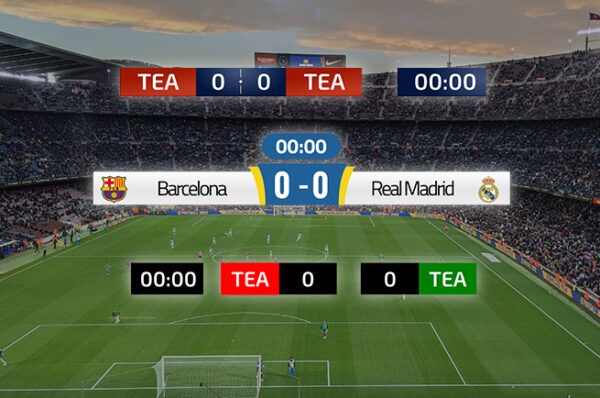
Live streaming overlays enhance viewer engagement by presenting real time data, scores, and team changes without distracting from the action. When you choose a solution for broadcasting, you want reliable visuals that adapt to different scenes, from close ups to full game footage. A well Vmix Scoreboard Overlay Free designed overlay should be easy to implement, lightweight on system resources, and customisable to reflect your branding. This article covers practical steps to deploy overlays that work across popular streaming setups while keeping production smooth and viewer friendly.
Choosing a free overlay option
Free overlay packages provide a low risk way to test how on screen information looks during a broadcast. Look for options that offer transparency support, adjustable text, and simple layer management so you can stack data without clutter. Even without paid Team Formation Overlay tools, you can achieve professional results by planning placement, ensuring contrast with the game visuals, and keeping critical information near the centre of the frame. Remember to test at different resolutions to prevent scaling issues.
Vmix Scoreboard Overlay Free
When integrating scoreboard data into vMix, ensure the overlay file is compatible with your version of the software and that it renders smoothly across transitions. Use a dedicated scene or input for scores so updates stay in sync with play by play. A lightweight PNG or transparent video can work, but consider delivering text only overlays for legibility. Regularly preview changes during practice sessions to avoid unexpected flicker or misalignment during a live stream.
Team Formation Overlay
A Team Formation Overlay helps viewers track player positions and arrangements in real time, which is especially useful for strategy games or coaching broadcasts. Design it to be non intrusive, with clear markers for each position and an intuitive legend. You can layer this behind score data or frame it to appear alongside the action when formations shift. Keep the palette consistent with your branding to reinforce recognition without overwhelming the screen.
Practical setup tips
Plan your layout with a grid approach, reserving space for essential data such as score, time, and formation indicators. Test colour contrasts in different lighting conditions and monitor sizes to guarantee readability. Save your overlay as an interchangeable asset set so you can swap themes or update team colours between matches. Document the setup steps for your team so new contributors can reproduce the exact look and feel quickly and reliably.
Conclusion
For ongoing enhancements, consider exploring related tools and communities to learn new setup tricks. OBScoreboard